Spades: Classic Card Game
- 4.9
- Rating
- 5.00M
- Installs
- Free
- Price
 Analysis by App-foxy
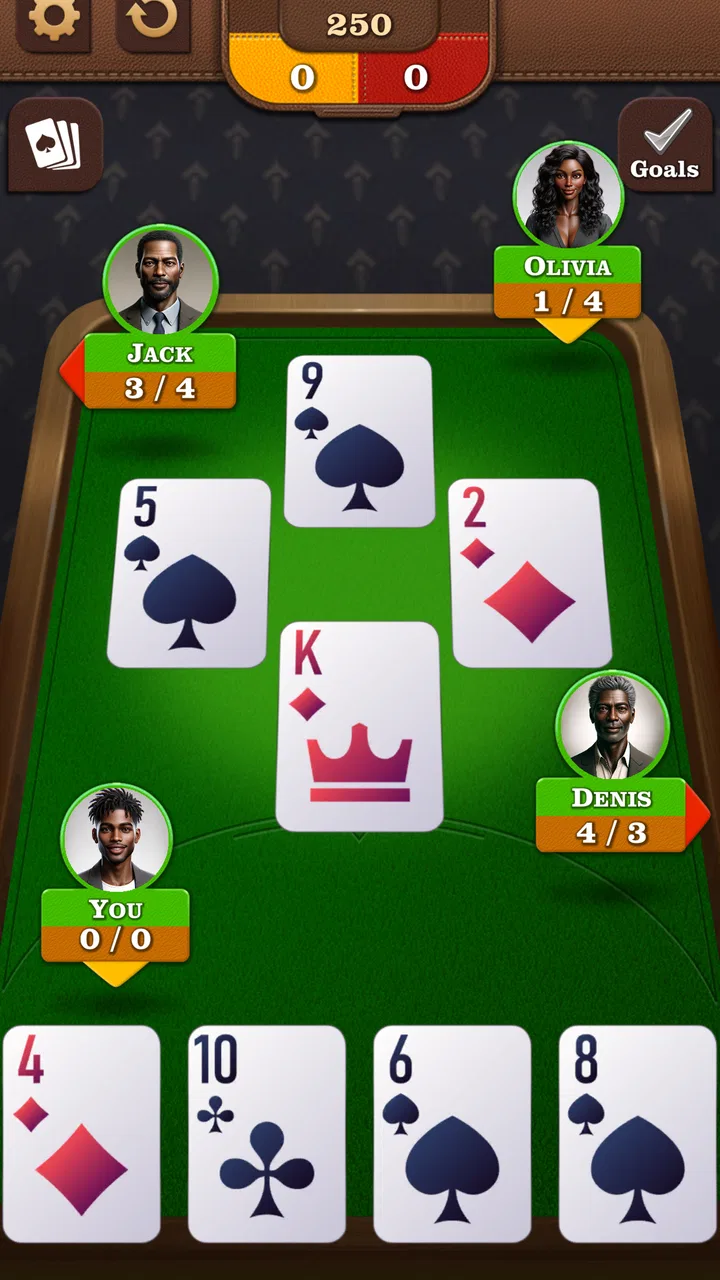
I enjoy card games most when they remove the need for a table, a deck and three other people who happen to be free at the same time. Spades: Classic Card Game takes that approach with a focused version of the traditional trick-taking game. I tested it as a quick offline pastime rather than as a social platform, and that distinction matters: its appeal is the ability to start a hand without waiting for a connection. It is a free card game from NewPubCo, rated for Everyone, and it has built a strong audience with a 4.9 average from around 56 thousand ratings and more than 5 million installs.
The first thing I noticed is how narrow the experience is in a good way. This is not trying to be a collection of unrelated casino games or a busy entertainment hub. The entire point is to play Spades, learn its rhythm and improve your decisions from hand to hand. If you already know how bidding and tricks work, you can get into a game quickly. If you are new, the opening learning curve is less about complicated controls and more about understanding when to make a bid, when to protect a partner and when to accept that a trick is not worth chasing.
Getting past the first points of friction
Most problems with a compact card game happen before the first hand begins. A player may expect a large menu, online matchmaking or a long tutorial, while this title is better understood as a straightforward way to play classic Spades offline. That difference in expectation can make the app feel limited even when it is doing exactly what it was designed to do.
You May Also Like

 Blood Strike: 2.5 Anniversary
Blood Strike’s Loadouts Turn Every Drop Into a Tactical Gamble
A close look at Blood Strike’s custom loadouts: how fast access to signature weapons reshapes its battle royale rhythm, rewards preparation, and narrows the gap between fights.

 Pandora - Music & Podcasts
Pandora’s Music Is Easy to Start, but Harder to Recover
Pandora’s strength is its low-effort path from a seed to a station. Its weak spot is how much confidence it asks you to place in connection, setup, and quiet recovery.

 8 Ball Pool
 Is Built on Rivalries, Rematches, and Routine
A close look at the rivalries, rematches, shared routines, and unanswered safety questions that turn a quick pool match into a persistent mobile community.

 Samsung Music
’s Quiet Strength Is Playing What You Already Own
Its reach comes less from spectacle than from dependable access to a personal library. That simplicity is both the app’s strongest retention engine and its ceiling.

 AccuWeather: Weather Radar
AccuWeather Review: A Quick, Clear Forecast for Everyday Decisions
For everyday plans, the best forecast is the one you can understand quickly. AccuWeather makes rain timing, radar, and local conditions easy to act on, with a few trade-offs.

 Hill Climb Racing
Why Hill Climb Racing Still Turns Crashes Into One More Run
A tiny car, a bumpy hill and one more upgrade: Hill Climb Racing keeps resurfacing because its simple chaos makes every near-miss feel personal.
More From Our News Desk



My practical advice is to install it with a specific use in mind. It works best for a commute, a waiting room, a quiet evening or any moment when you want a self-contained game that does not depend on another player being available. The offline focus is also useful when a connection is unreliable. You can treat a short session as a mental reset instead of spending the first few minutes signing in, searching for a table or dealing with a lost match.
The game is free to download, with optional in-app purchases ranging from $0.99 to $9.99 per item. That makes it easy to try without committing money first, but I would still approach the purchase options deliberately. If you only want occasional hands, the free experience may be enough for your routine. If you are sensitive to interruptions or dislike optional spending in casual games, check what is presented during use before deciding whether it deserves a purchase.
Another useful expectation check concerns the age rating. The game is suitable for Everyone, so its presentation is aimed at broad accessibility rather than mature themes or intense content. That makes it a reasonable choice for a family tablet or a shared device, although a general age rating does not automatically mean that every player will enjoy the strategy. Younger players may still need someone to explain bidding, trump control and the consequences of overcommitting.
What to check before blaming the game
When a game does not open or behaves oddly, I start with the simple checks. The current version is 2.6.0, and the minimum operating system is Android 7.0. On an older Android device, the operating system requirement is the first thing to verify. On a newer device, I would check that the installation completed properly, that the phone has enough free space for normal app operation and that the device has not placed the game in an aggressive battery-saving state.
These checks sound obvious, but they prevent a common mistake: treating every launch problem as a gameplay defect. A card game can appear frozen when the phone is finishing an update, restoring an interrupted installation or closing background processes. Restarting the device, opening the game again and trying a fresh session is often a more useful first step than repeatedly tapping the same button.
If you are using a device with several people sharing one profile, confirm that the correct app is being opened and that the installation was not paused. This matters particularly on older phones and tablets, where a download can sit incomplete without making the reason immediately clear. I would also avoid testing the game while several demanding apps are running in the background, because a low-memory device can make a simple title feel less responsive than it normally is.
For someone moving from another Spades app, the setup check is also about habits. Do not assume that every version presents bids, tricks or round results in exactly the same place. Spend a moment reading the screen before making the first move. That small pause is worthwhile because an accidental tap in a card game can change the entire hand, especially when you are playing quickly.
Recovering a session without making the problem worse
If a hand appears to stop progressing, I would first wait briefly and look for a visible prompt or a move that still needs to be made. In a trick-taking game, the screen can look unchanged when the next action is simply waiting for your selection. Tapping repeatedly is not a good recovery method: it can produce an unintended card choice if the interface catches up all at once.
A safer workflow is to finish the current screen if possible, leave the game normally and reopen it. If that does not help, close the app completely and start a new session. I would use a device restart only after those lighter steps fail. This order keeps troubleshooting simple and reduces the chance of turning a temporary pause into a more confusing state.
It is also worth separating a single awkward hand from a genuine technical problem. In Spades, a poor result may feel like the game has made a bad decision against you, but the result can come from an aggressive bid, a misread suit or a partner whose cards do not support your plan. Before reinstalling anything, replay the situation mentally: did the game actually stop responding, or did the hand simply go against you?
Reinstallation should be a last resort for a casual offline game because it may remove local progress or settings, depending on how the device handles app storage. I would only take that step after trying a clean restart and confirming that the issue happens repeatedly. If the problem appears only once, continuing with a new hand is usually the more sensible choice.
One of the most useful habits I developed while playing was to slow down after an unexpected result. Instead of immediately changing settings or concluding that the computer partner is broken, I review the bid and the suits already played. This turns a frustrating moment into information. A failed contract often reveals that I counted high cards but ignored how many times an opponent could force a suit out of my hand.
Where the player, device or connection is really responsible
Because the game is designed around offline play, a weak connection should not be the first explanation for an ordinary in-game decision. If the app opens and the cards respond, a lost signal is unlikely to explain why a bid failed or why a trick went to another player. That is an important distinction for troubleshooting: network concerns belong mainly around installation or other device activity, while the core card session is intended to be usable without Wi-Fi.
The same principle applies to battery behavior. If the game closes only after the phone has been sitting untouched for a long time, the device may be restricting background activity rather than the game malfunctioning. If it closes immediately every time, then the operating system version, installation state or available device resources deserve attention. Looking for a pattern is more useful than assuming every crash has the same cause.
Some apparent interface issues are really display or input issues. A crowded screen, a protective case or a tired touchscreen can make a card tap register differently from what you intended. I found that playing at a comfortable pace is especially important on a smaller phone. On a tablet, cards and controls are easier to inspect, but the game becomes less convenient to carry around. The best device is therefore not simply the newest one; it is the one where you can clearly distinguish the cards and tap without rushing.
There is also a human cause that is easy to overlook: fatigue. Spades rewards attention to suits, the number of tricks already taken and the likely distribution of cards. After a long day, I make more mistakes by bidding from optimism rather than evidence. When that happens, switching to a shorter session or taking a break improves the experience more than changing the app. The offline format makes that easy because there is no obligation to remain in a live match.
How the game feels in regular use
The strongest part of Spades: Classic Card Game is its focus. I can open it when I have only a few minutes and play without organizing a group. That makes it more practical than a physical deck when I am alone, and less demanding than a multiplayer card app when I do not want chat, matchmaking or a public table. The game is also a useful way to practice recognizing risk: each hand asks me to balance what I can probably take against what I must avoid giving away.
My most effective routine is to treat bidding as a forecast rather than a wish. I count likely winners, consider whether the suits in my hand can be controlled and leave room for uncertainty. If I am unsure, I prefer a cautious bid and use the early tricks to learn how the other hands are distributed. This approach is more valuable than trying to win every trick, because Spades punishes overconfidence in a very direct way.
A second technique is to track which suits have already been played instead of focusing only on my own cards. When a suit disappears from a player’s hand, that player may gain an opportunity to use spades later. I do not need a perfect mental record of every card; remembering who is short in each suit is often enough to make a better decision. This is the kind of practice an offline game supports well, because I can pause mentally between tricks without worrying about holding up a human opponent.
A third insight is that a lost trick can still be useful. Sometimes I deliberately let an opponent take a trick when protecting the rest of my hand matters more. New players often treat every lost trick as a mistake, but the better question is whether the loss improved the chances of completing the contract. The app works well as a training space for that judgment because I can experiment without the social pressure of a live table.
Compared with a physical deck, the main advantage is convenience. The game handles the dealing and keeps the session ready whenever I am alone. Compared with a broad collection of card games, its advantage is concentration: there is less menu browsing and less temptation to jump between unrelated modes. Compared with online Spades, the trade-off is social energy. Offline play is calmer and more dependable, but it cannot replace the fun of negotiating with real friends or testing yourself against a live community.
That trade-off defines who should skip it. If your main reason for playing Spades is conversation, competition with known people or a constantly changing online environment, this is probably not the best first choice. I would also skip it if you want a large variety of card games in one installation. Its value comes from doing one traditional game conveniently, not from offering a huge catalog.
On the other hand, I would recommend it to someone learning the basics, someone who wants a no-connection card game, or someone who already knows Spades and wants a quick solo practice tool. It is especially suitable for players who prefer making their own decisions rather than managing a complicated interface. The Everyone rating also makes it easier to consider for shared household devices, provided that the player understands the rules.
What the numbers suggest, and what they do not
The game’s 4.9 average and roughly 8.4 thousand written reviews indicate that many players find the focused format satisfying. Its audience is not tiny either: the title has passed 5 million installs. I see those figures as a useful sign of reliability and appeal, not as proof that it will suit every preference. A popular offline card game can still feel too quiet for someone who expects live opponents, and a highly rated title can still have a learning curve for a newcomer.
NewPubCo has kept the product centered on the classic Spades idea rather than turning it into a visually overloaded experience. That helps the game remain approachable, but it also means players looking for deep customization or a broad progression system may find less to explore. I prefer that honesty of purpose, although I would have liked more guidance during my earliest hands. The rules are familiar to experienced players, yet a beginner benefits from clear explanations of why a bid succeeded or failed.
The free entry point is another strength, but optional purchases deserve a practical look. I would not buy anything simply because a prompt appears during a casual session. First, play enough hands to decide whether the basic rhythm suits you. If you return regularly and the available purchase improves your comfort, it may be reasonable; if you only open the app during occasional spare minutes, keeping the experience free is likely the better value.
My practical verdict after using it
Spades: Classic Card Game succeeds because it understands the appeal of an uncomplicated card session. I can use it offline, play at my own pace and practice decisions that are difficult to learn from a rules page alone. Its best qualities are convenience, focus and the low barrier to trying it. The realistic limitations are just as clear: it is not a substitute for a social table, it may feel repetitive if you need constant variety and a new player may need time to understand the strategy behind the simple taps.
For the smoothest experience, I would install it on a device running Android 7.0 or later, begin with a calm practice session and avoid judging the game by one unlucky hand. If the app seems stuck, check whether a move is waiting, restart the session and only then investigate the device. If a result feels unfair, review the bid and played suits before assuming a technical fault. Those small habits make the game easier to enjoy and also make the card lessons more useful.
My final recommendation is positive but specific: choose it if you want classic Spades available whenever you are offline and you value a clean, focused solo experience. Choose a multiplayer alternative instead if real opponents, conversation and social competition are the main attraction. For everyone in between, the free download makes trying it low-risk, and the combination of a broad audience, a 4.9 average and a simple offline purpose gives it a strong place among Android card games. I would keep it installed for those ordinary gaps in the day when a few thoughtful tricks are exactly enough entertainment.
FAQs for Spades: Classic Card Game
01What features make Spades: Classic Card Game stand out from other card games?
Spades: Classic Card Game offers a range of features that enhance the traditional card game experience. It includes multiple game modes, customizable rules, and smooth graphics. Players can enjoy both online multiplayer and offline modes, allowing for flexible gameplay. The app also includes detailed statistics to track performance and progress.
02Is Spades: Classic Card Game suitable for beginners?
Yes, Spades: Classic Card Game is designed to be accessible for players of all skill levels. The app provides an intuitive tutorial that helps newcomers understand the basic rules and strategies. Additionally, the user-friendly interface and adjustable difficulty settings ensure that beginners can enjoy the game while gradually improving their skills.
03Does Spades: Classic Card Game require an internet connection?
Spades: Classic Card Game can be played both online and offline. While an internet connection is required for online multiplayer mode to compete with other players globally, the app also offers an offline mode where users can play against AI opponents. This flexibility makes it convenient for users to play anytime, anywhere.
04Are there in-app purchases or ads in Spades: Classic Card Game?
Yes, Spades: Classic Card Game may include in-app purchases and advertisements. While the game is free to download, players have the option to purchase additional features or remove ads for a more streamlined experience. These purchases are optional and are not required to enjoy the core gameplay.
05How does Spades: Classic Card Game handle player privacy and data security?
Spades: Classic Card Game takes user privacy and data security seriously. The app adheres to industry standards for data protection and includes a privacy policy outlining what data is collected and how it is used. Players are encouraged to review these policies to understand their rights and the app’s practices regarding personal information.
Pros
- Smooth gameplay with intuitive controls.
- Offers both online and offline modes.
- Various difficulty levels for all players.
- Engaging graphics and sound effects.
- Regular updates with new features.
Cons
- Contains ads that can be intrusive.
- Limited customization options for avatars.
- Requires internet for some features.
- Occasional connectivity issues in multiplayer.
- No tutorial for beginners.

Spades: Classic Card Game
Gallery